Thank you, and welcome
Your plan unlocks every map mode and the tools of the maps that it covers.
Your account page shows the plan as soon as the provider confirms the payment. That takes about a minute.
Each map has a short tour. The first time that you open a map, the tour starts. You can start it again from the box behind the question mark.
Open your account pageWelcome to Atlas
Your account is ready. Every map is free with its political map mode, and the sample save of a map is free too.
A plan unlocks every map mode and the tools: the loader for your own saves, the ledger and sharing.
Each map has a short tour. The first time that you open a map, the tour starts.
See the plansHow to use the maps
Updated 7 October 2026
This page explains each map: what each control does, the keys, the sample save, and what comes next. Each map also has a short tour. The tour points at each control on the map itself.
Your plan
Every map is free with its political map mode. The sample save of a map is free too.
A subscription unlocks every map mode and the tools of the maps that it covers. One of these tools is the loader for your own save files.
Your account page shows which maps your account unlocks.
- Unlock one map
Every map mode. Load your own save files. The ledger and every tool the map has. Every update to that map.
- Unlock every map
All 7 maps, and each new one. Every map mode, on every map. Load your own save files. The ledger and every tool.
The sample save
Some maps come with a sample save. It comes from a real game. Press Sample save in the bar to load it.
A save fills the panels that a start date cannot fill, such as the top bar and the economy. The page reads the sample the same way that it reads your own save.
To go back to the start date, reload the page. Some maps also have a key for this. The keys of each map are below.
These maps have one: Europa Universalis IV and Europa Universalis V.
Your own save
Press Load a save, or drop the file on the map. Your browser reads the file. The page does not upload the file, and the file stays on your computer.
After a save loads, Share makes a link to the map of that save. Anybody can open the link.
The controls
- The map
Drag to move the map, and scroll to zoom. Click a province to open the province window. Right-click a province to open the window of its owner.
- Other maps
Press the name of the map to open the list of the other maps.
- All maps
The globe takes you back to the page with every map.
- Start date
Pick one of the twelve start dates of the game.
- Map modes
Choose what the map shows: the owners, religion, terrain and more.
- The top bar
The figures of the played country, as the game shows them.
- The ledger button
Opens the ledger: the economy of every country, year by year.
- The date panel
The date of the map, in the panel of the game.
- Search
Type the name of a country or a place. Pick a result to go to it.
- The sample save
Load the save that comes with this map. It fills the panels that only a save can fill. The sample is free.
- Load a save
Open a save file from your computer, or drop the file on the map. Your browser reads the file. The file stays on your computer.
- Share
Make a link to the map of the save that you loaded. Anybody can open the link.
- Reset view
Zoom out to the whole map, and clear the selection.
- Controls and shortcuts
This box lists every key of this map. You can start this tour again from the box.
The windows
The province window
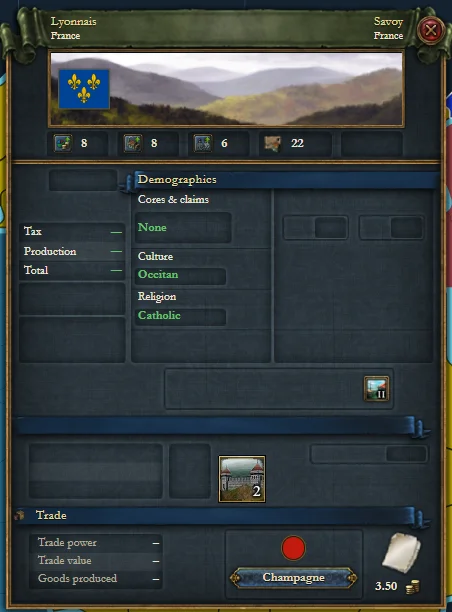
The window of the game for one province: its owner, its development, its trade good, its trade node and more. Click a province to open it.
The country window
The window of the game for one country. Right-click a province, or press the flag in the province window, to open it. Its tabs follow.
- Court
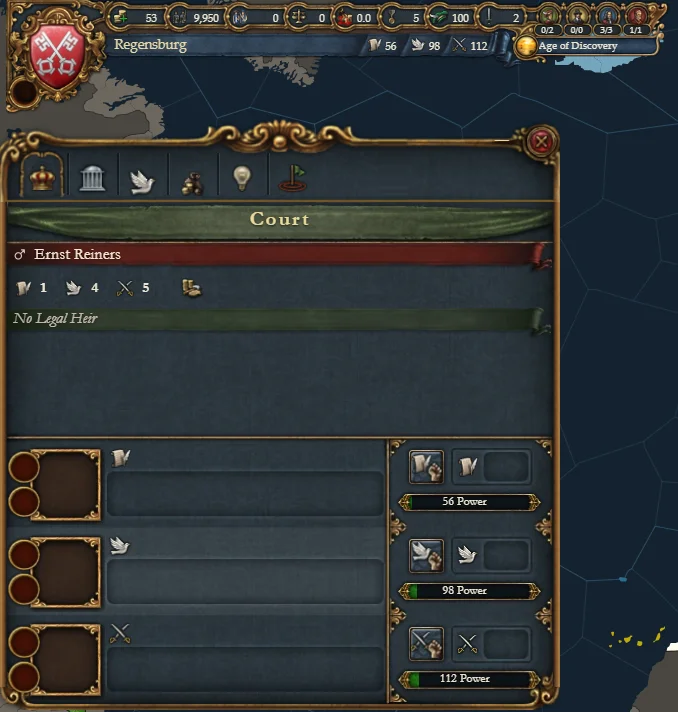
The ruler, the heir and the consort, with their skills and traits, and the advisors.
- Government
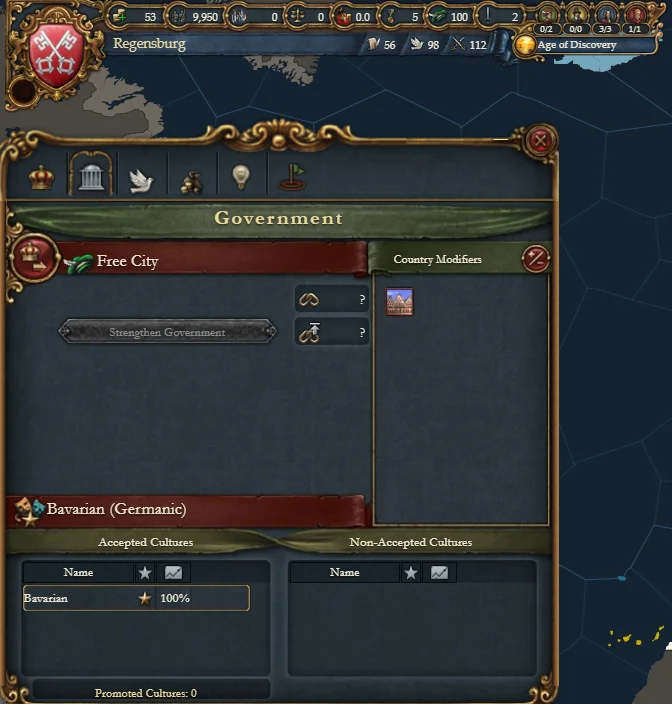
The form of government, its reforms, and the modifiers of the country.
- Diplomacy
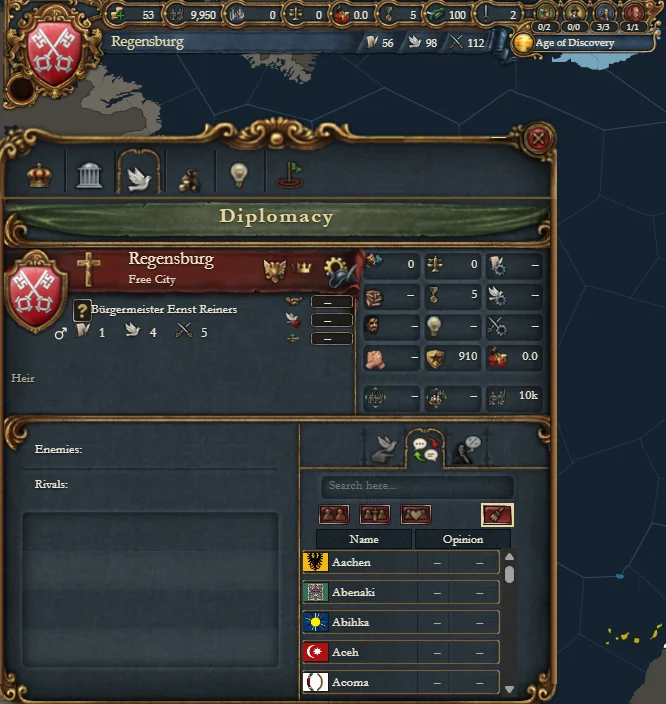
The relations of the country: its allies, its marriages, its subjects, its wars and the opinions of the others.
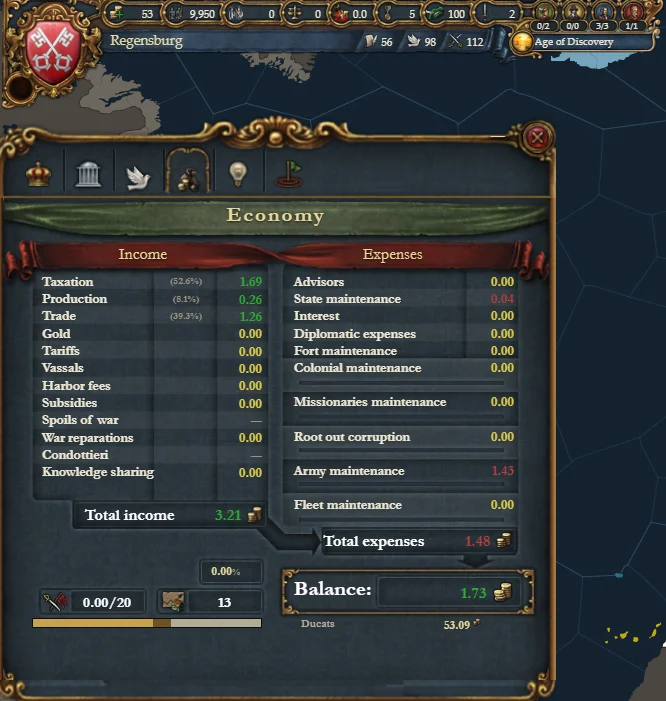
- Economy
Income and expenses. A save fills this tab, and the sample save does too.
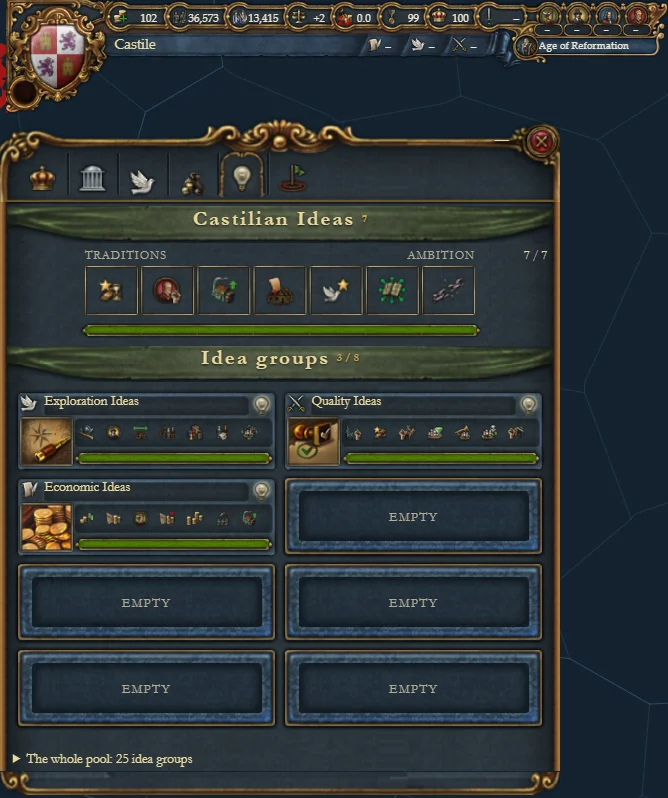
- Ideas
The national ideas and the idea groups of the country.
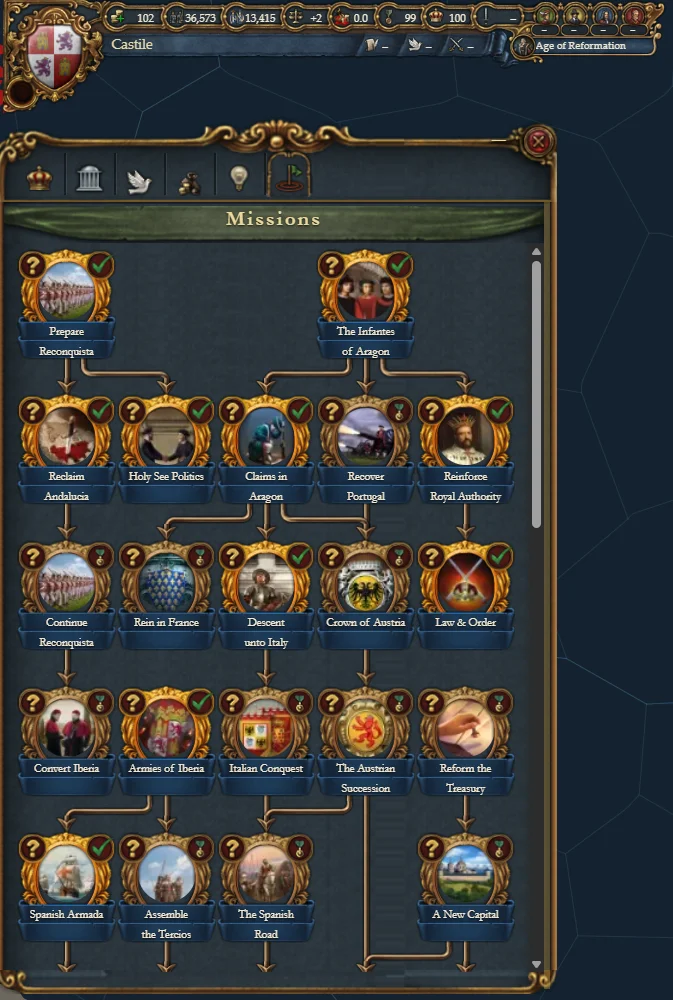
- Missions
The mission tree of the country. Under a save, a finished mission has a tick.
- Court
The ledger
The economy of each country, year by year, from the save. Tick a country in the list to draw its line on the chart.
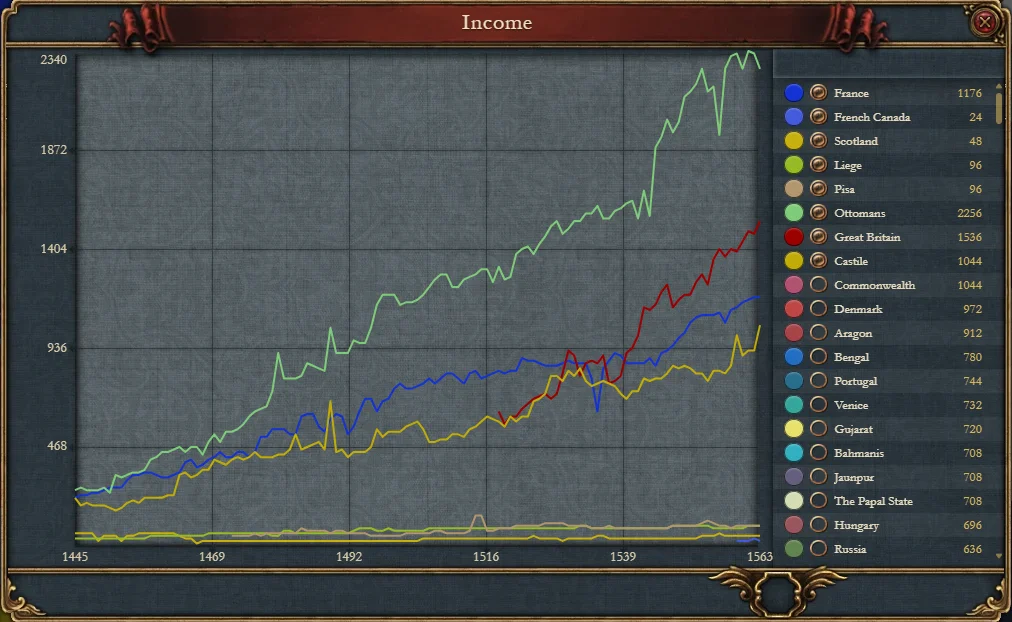
This one needs a save. The sample save is enough.
The pointer and the keys
| Press | What it does |
|---|---|
| Drag | Pan the map |
| Scroll | Zoom in and out |
| Click | Select a province and open its details |
| / | Search a country or a province |
| UpDown | Move through the search results |
| Enter | Open the top result |
| M | Step to the next map mode |
| W | Go straight to the Political map mode |
| R | Go straight to the Diplomacy map mode |
| Q | Go straight to the Religion map mode |
| T | Go straight to the Holy Roman Empire map mode |
| E | Go straight to the Trade nodes map mode |
| [] | Step through the twelve start dates |
| K | Show or hide the map key |
| L | Open the ledger |
| H | Hide the details plates and keep the selection |
| +- | Zoom in and out |
| Backspace | Leave a loaded save and go back to the start date |
| Esc | Clear the selection |
| ? | Open and close this box |
On the map now
- Map modes
Political, trade, religion and more, in the colours of the game.
- All 12 start dates
Every bookmark that the game ships, from 1444 to 1792.
- Country window
The game's own window, with six tabs.
Court, Government, Diplomacy, Economy, Ideas, Mission tree
- Province window
The game's own window for each province.
- Ledger
The economy charts, year by year.
- Top bar and date panel
The figures of the played country, as the game shows them.
- Trade network
The 80 trade nodes, and the routes that the game draws between them.
- Map labels
Country names fitted to their land in every map mode.
- Load a save
Plain and ironman saves. Your browser reads the file, and the file stays on your computer.
- Share a save
Send a link to the map of your campaign. Anybody can open it.
Planned
- Country window: Court
Correct the advisor icons.
- Country window: Government
Show the special mechanics of some nations, and correct the country modifiers.
- Country window: new tabs
Trade, Technology, Decisions and policies, Stability, Religion, Military, Subjects, Estates
- Province window: more fields
Add the remaining fields. The game calculates some fields while it runs, so the page cannot show every field.
- Ledger: more data
Add more charts and tables than the economy.
- Trade map mode: more data
Show more figures for each trade node.
- Papacy view
- Holy Roman Empire view
- Mandate of Heaven view
The controls
- The map
Drag to move the map, and scroll to zoom. Click a country to open the country window. Zoom in close, then click a location to open the location window.
- Other maps
Press the name of the map to open the list of the other maps.
- All maps
The globe takes you back to the page with every map.
- Map modes
Choose what the map shows: the owners, religion, terrain and more.
- The top bar
The figures of the played country, as the game shows them.
- The country strip
Each button opens a window of the game for the played country.
- Search
Type the name of a country or a place. Pick a result to go to it.
- The sample save
Load the save that comes with this map: Milan on 1 April 1337. It fills the top bar and the windows that only a save can fill. The sample is free.
- Load a save
Open a save file from your computer, or drop the file on the map. Your browser reads the file. The file stays on your computer.
- Share
Make a link to the map of the save that you loaded. Anybody can open the link.
- Reset view
Zoom out to the whole map, and clear the selection.
- Controls and shortcuts
This box lists every key of this map. You can start this tour again from the box.
The windows
The location window
The window of the game for one location: its province, its rank, its scene and its conditions. Zoom in close and click a location to open it. Its tabs follow.
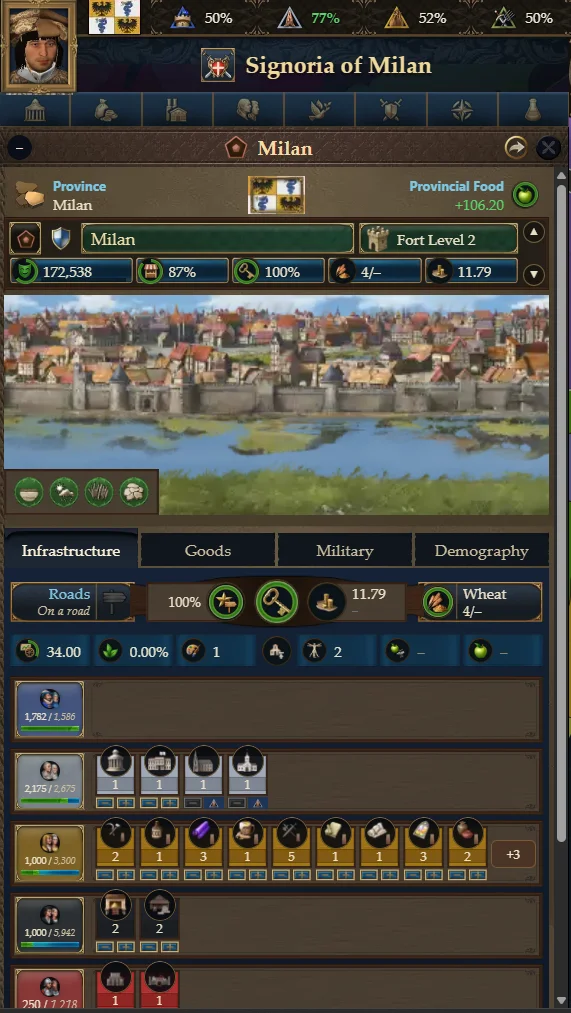
- Infrastructure
The roads, the control, the tax base, the raw material, the buildings of each class and the market.
- Goods
The raw material, and each good that the buildings of the location make.
- Military
The fort, the garrison, and the countries that hold a core on the location.
- Demography
The population: each class, culture and religion, with its size, change and share.
- Infrastructure
The country window
The window of the game for one country: the type of government, the throne room with the ruler, and the main figures. Its tabs follow.
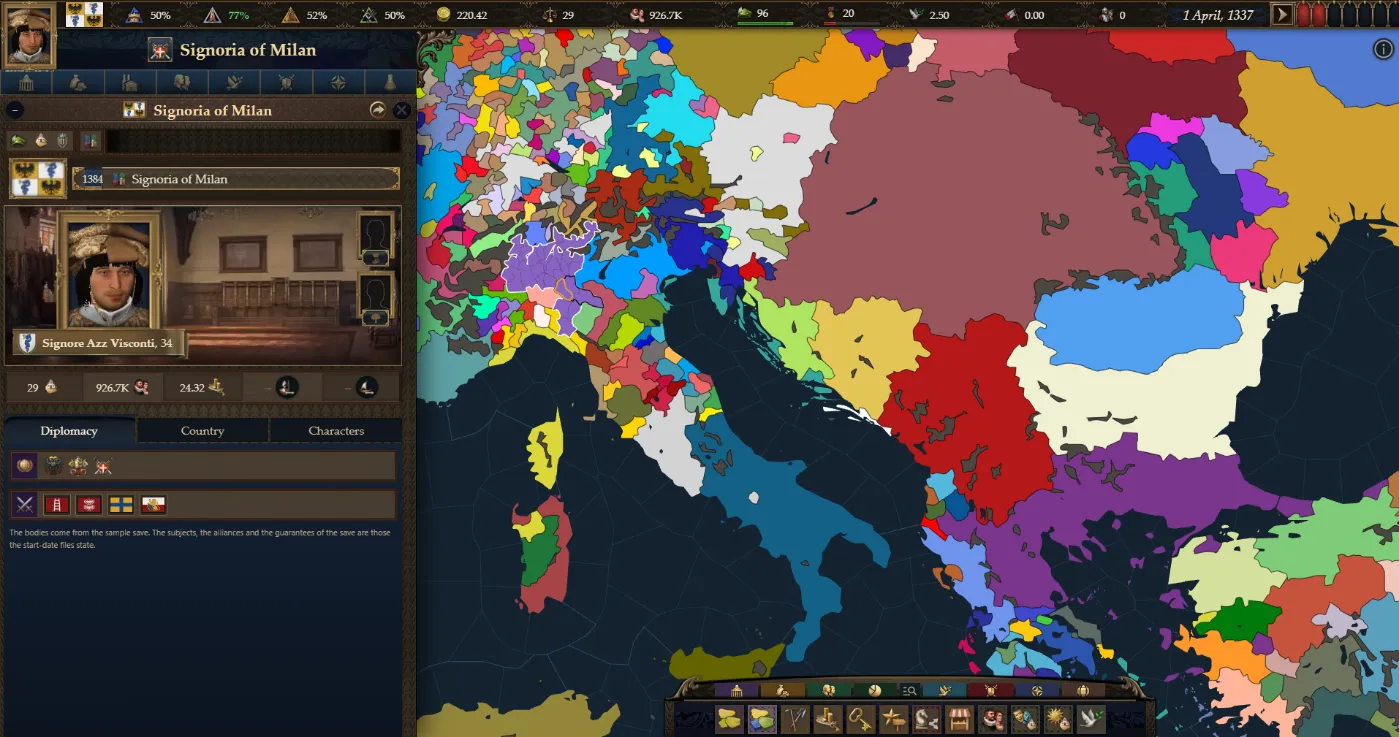
- Diplomacy
The bodies that the country belongs to, its subjects, and each kind of tie with another country.
- Country
The capital, the figures, the culture, the languages, the laws and the reforms.
- Characters
Every character at the court, on the card of the game.
- Diplomacy
The pointer and the keys
| Press | What it does |
|---|---|
| Drag | Pan the map |
| Scroll | Zoom in and out |
| Click | Select a location and open its details |
| / | Search a country or a location |
| UpDown | Move through the search results |
| Enter | Open the top result |
| M | Open and close the list of every map mode |
| Ctrl+QQ | Go straight to the Terrain map mode |
| Ctrl+WW | Go straight to the Political map mode |
| Ctrl+EE | Raw Materials. Press it again for Location Rank, then Urban Rights |
| Ctrl+RR | Tax Base. Press it again for Location Wealth, then Development, then Prosperity |
| Ctrl+TT | Control. Press it again for Roads |
| Ctrl+YY | Proximity to Capital. Press it again for Roads |
| Ctrl+AA | Go straight to the Tactical map mode |
| Ctrl+SS | Markets. Press it again for Market Access |
| Ctrl+DD | Population. Press it again for Majority Social Class |
| Ctrl+FF | Cultures (Location). Press it again for Primary Culture, then Culture Groups |
| Ctrl+GG | Religions (Location). Press it again for Religions (Country), then Religious Schools, then Religion Groups, then Holy Sites |
| Ctrl+HJ | Go straight to the Diplomacy map mode |
| K | Show or hide the map key |
| H | Hide the details plate and keep the selection |
| +- | Zoom in and out |
| Esc | Clear the selection |
| ? | Open and close this box |
On the map now
- Map modes
The game's own map mode bar.
- Rulers in 3D
Each face comes from the DNA in the save, and wears the clothes that the game chooses.
- Location window
The game's art, and data from the game in all four tabs.
Infrastructure, Goods, Military, Demography
- Country window
Actual data in all three tabs.
Diplomacy, Country, Characters
- Top bar and flags
The figures of the played country, and a flag for every country.
- Load a save
Plain and binary saves. Your browser reads the file, and the file stays on your computer.
- Share a save
Send a link to the map of your campaign. Anybody can open it.
Planned
- Country window: all portraits
Show a portrait for every character in the Characters tab.
- Right-click menu
- Top bar windows
Government, Economy, Production, Society, Diplomacy, Military, Geopolitics, Advances
- Advances tree
- Ledger
- Dynasty tree
- Bottom bar
Finish the remaining icons and features.
The controls
- The map
Drag to move the map, and scroll to zoom. Click a state to open the state view. Right-click a country to open its politics view.
- Other maps
Press the name of the map to open the list of the other maps.
- All maps
The globe takes you back to the page with every map.
- Start date
Change between the two start dates. The owner of each state changes with it.
- Map modes
Choose what the map shows: the owners, religion, terrain and more.
- Province borders
Show the province borders inside each state. They follow the zoom until you press this.
- The top bar
The figures of the played country, as the game shows them. The flag opens the politics view.
- Search
Type the name of a country or a place. Pick a result to go to it.
- Load a save
Open a save file from your computer, or drop the file on the map. Your browser reads the file. The file stays on your computer.
- Share
Make a link to the map of the save that you loaded. Anybody can open the link.
- Reset view
Zoom out to the whole map, and clear the selection.
- Controls and shortcuts
This box lists every key of this map. You can start this tour again from the box.
The windows
The state view
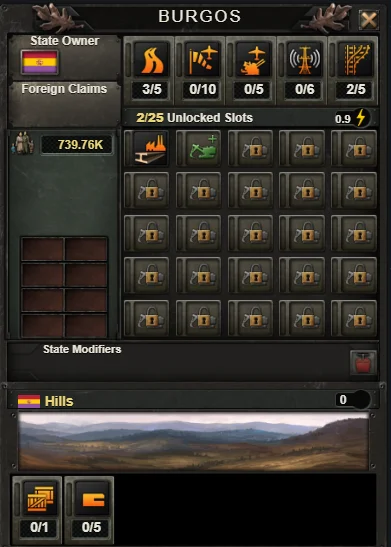
The state window of the game. It shows the provinces, the buildings, the resources, the victory points and the claims on the state. A click on any land opens it.
The politics view
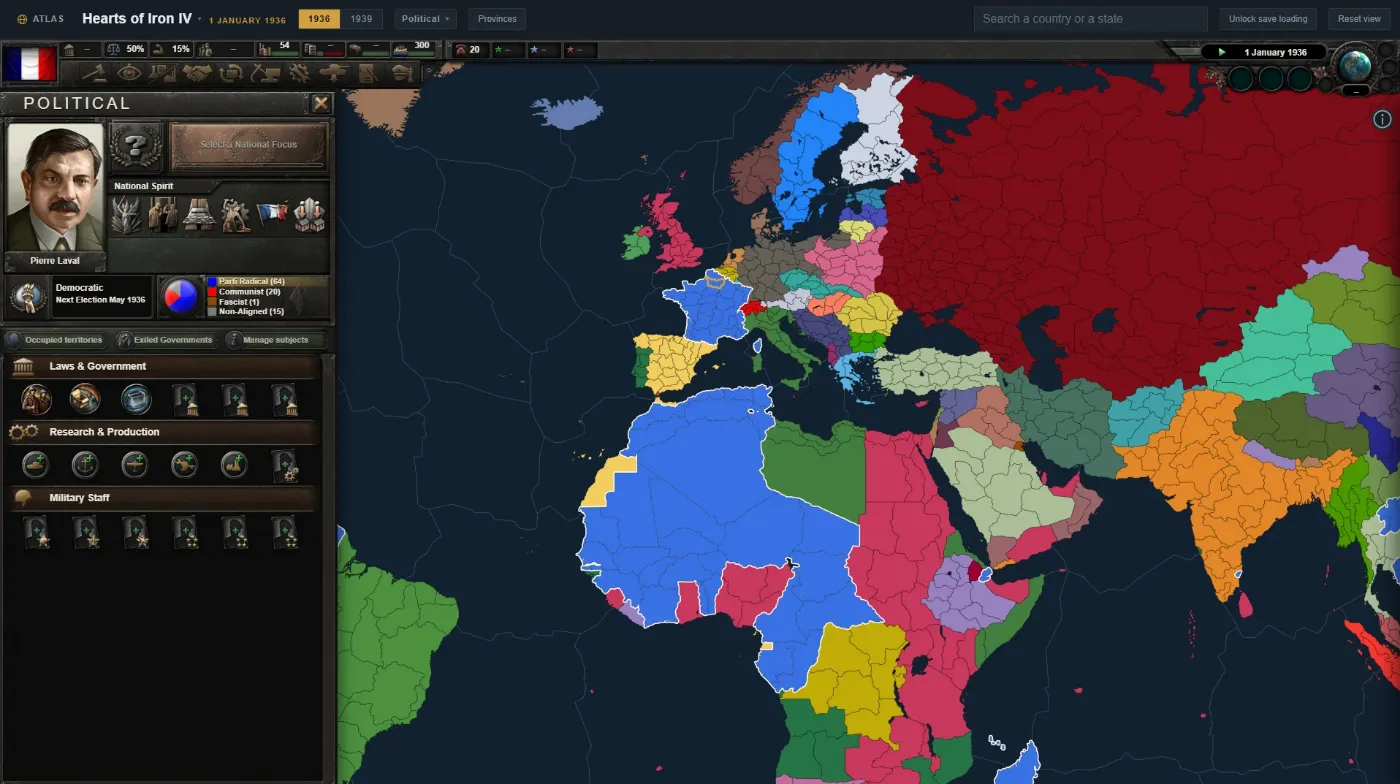
The government of the country: the party support, the leader and the head of state, and the national spirits. Q opens it, and so does the flag in the top bar.
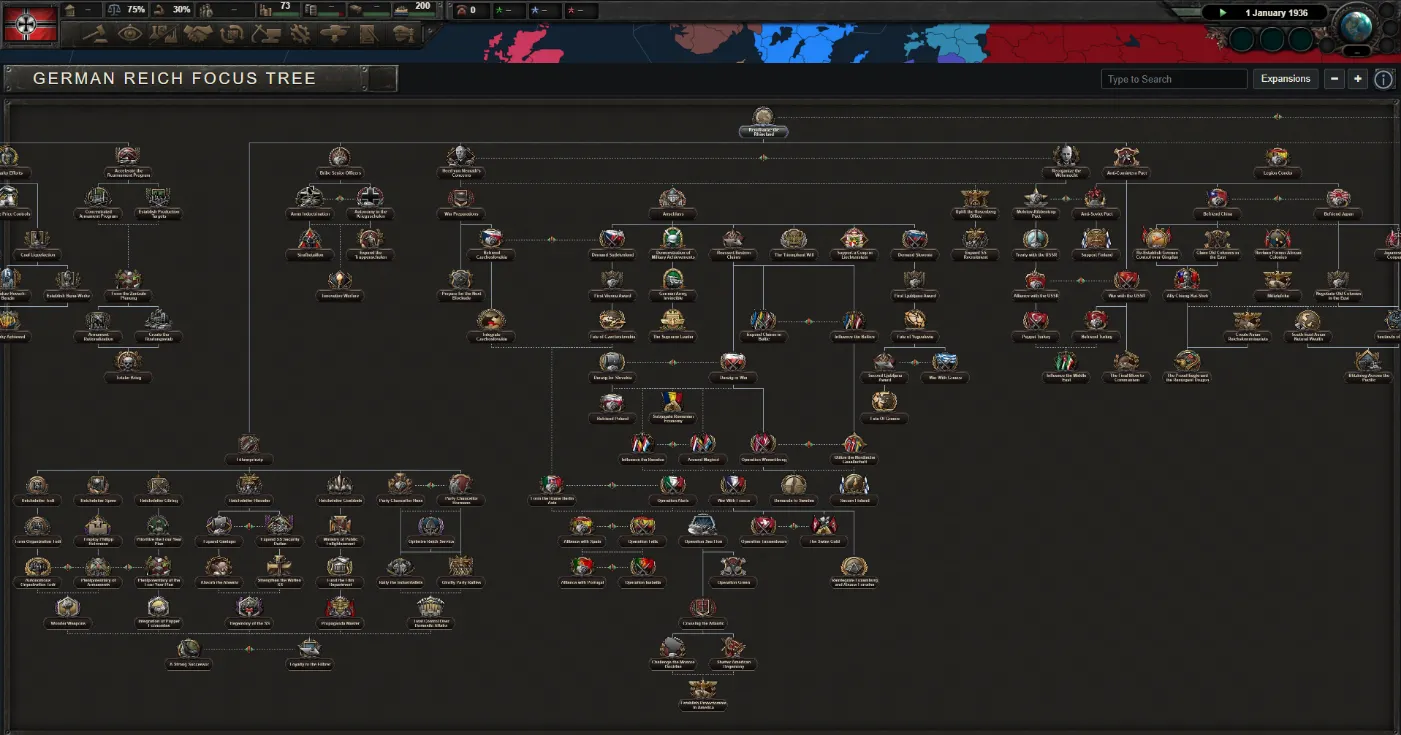
The national focus tree
Every focus of the country, the links between them, and the effect of each one. The focus shelf of the politics view opens it. Point at a focus to read it.
The pointer and the keys
| Press | What it does |
|---|---|
| Drag | Pan the map |
| Scroll | Zoom in and out |
| Click | Select a state and open its details |
| / | Search a country or a state |
| UpDown | Move through the search results |
| Enter | Open the top result |
| D | Switch between 1936 and 1939 |
| M | Step to the next map mode |
| P | Turn the province borders on and off |
| K | Show or hide the map key |
| Q | Open and close the politics view of the selected country |
| H | Open or hide the details plate, and keep the selection |
| +- | Zoom in and out |
| Backspace | Leave a loaded save and go back to the start date |
| Esc | Close the state view or the politics view, then clear the selection |
| ? | Open and close this box |
On the map now
- Map modes
- Both start dates
1936 and 1939. One click changes the owner of every state.
- Province and state view
The game's own state window for each state.
- Politics view
Almost every field is full.
Party support, Ruler and head of state, National spirits
- National focus tree
The tree of each country, with the effect of each focus.
- Top bar
The figures of the played country, as the game shows them.
- Load a save
Plain and ironman saves. Your browser reads the file, and the file stays on your computer.
- Share a save
Send a link to the map of your campaign. Anybody can open it.
Planned
- Focus tree: improvements
- Top bar: more windows
Some windows only change the game. The page can show only the windows that show a fact.
Decisions, Intelligence agency, Research, Diplomacy, Trade, Construction, Production, Recruit and deploy, Logistics, Officer corps
- Map mode bar
The game's own map mode controls and art.
- Stockpile window
The controls
- The map
Drag to move the map, and scroll to zoom. Click a state to open its details.
- Other maps
Press the name of the map to open the list of the other maps.
- All maps
The globe takes you back to the page with every map.
- Map modes
Choose what the map shows: the owners, religion, terrain and more.
- Search
Type the name of a country or a place. Pick a result to go to it.
- Load a save
Open a save file from your computer, or drop the file on the map. Your browser reads the file. The file stays on your computer.
- Share
Make a link to the map of the save that you loaded. Anybody can open the link.
- Reset view
Zoom out to the whole map, and clear the selection.
- Controls and shortcuts
This box lists every key of this map. You can start this tour again from the box.
The windows
The details plate
Click a country or a state, or pick one in the search, and its details open here. The list names its parts. Press one to go to it.
The pointer and the keys
| Press | What it does |
|---|---|
| Drag | Pan the map |
| Scroll | Zoom in and out |
| Click | Select a state and open its details |
| / | Search a country or a state |
| UpDown | Move through the search results |
| Enter | Open the top result |
| M | Step to the next map mode |
| K | Show or hide the map key |
| H | Hide the details plate and keep the selection |
| +- | Zoom in and out |
| Esc | Clear the selection |
| ? | Open and close this box |
On the map now
- Map modes
- Load a save
- Share a save
The controls
- The map
Drag to move the map, and scroll to zoom. Click a county to open its details.
- Other maps
Press the name of the map to open the list of the other maps.
- All maps
The globe takes you back to the page with every map.
- Start date
Change between 867 and 1066.
- Map modes
Choose what the map shows: the owners, religion, terrain and more.
- Search
Type the name of a country or a place. Pick a result to go to it.
- Load a save
Open a save file from your computer, or drop the file on the map. Your browser reads the file. The file stays on your computer.
- Share
Make a link to the map of the save that you loaded. Anybody can open the link.
- Reset view
Zoom out to the whole map, and clear the selection.
- Controls and shortcuts
This box lists every key of this map. You can start this tour again from the box.
The windows
The details plate
Click a country or a county, or pick one in the search, and its details open here. The list names its parts. Press one to go to it.
The pointer and the keys
| Press | What it does |
|---|---|
| Drag | Pan the map |
| Scroll | Zoom in and out |
| Click | Select a county and open its details |
| / | Search a realm or a county |
| UpDown | Move through the search results |
| Enter | Open the top result |
| D | Switch between 867 and 1066 |
| M | Step to the next map mode |
| K | Show or hide the map key |
| H | Hide the details plate and keep the selection |
| Esc | Clear the selection |
| ? | Open and close this box |
On the map now
- Map modes
- Both start dates
- Load a save
- Share a save
The controls
- The map
Drag to move the map, and scroll to zoom. Click a county to open its details.
- Other maps
Press the name of the map to open the list of the other maps.
- All maps
The globe takes you back to the page with every map.
- Start date
Change between 867 and 1066.
- Map modes
Choose what the map shows: the owners, religion, terrain and more.
- Search
Type the name of a country or a place. Pick a result to go to it.
- Load a save
Open a save file from your computer, or drop the file on the map. Your browser reads the file. The file stays on your computer.
- Share
Make a link to the map of the save that you loaded. Anybody can open the link.
- Reset view
Zoom out to the whole map, and clear the selection.
- Controls and shortcuts
This box lists every key of this map. You can start this tour again from the box.
The windows
The details plate
Click a country or a county, or pick one in the search, and its details open here. The list names its parts. Press one to go to it.
The pointer and the keys
| Press | What it does |
|---|---|
| Drag | Pan the map |
| Scroll | Zoom in and out |
| Click | Select a county and open its details |
| / | Search a realm or a county |
| UpDown | Move through the search results |
| Enter | Open the top result |
| D | Switch between 867 and 1066 |
| M | Step to the next map mode |
| K | Show or hide the map key |
| H | Hide the details plate and keep the selection |
| Esc | Clear the selection |
| ? | Open and close this box |
On the map now
- Map modes
- Both start dates
- Load a save
- Share a save
The controls
- The map
Drag to move the map, and scroll to zoom. Click a territory to open its details.
- Other maps
Press the name of the map to open the list of the other maps.
- All maps
The globe takes you back to the page with every map.
- Search
Type the name of a country or a place. Pick a result to go to it.
- Load a save
Open a save file from your computer, or drop the file on the map. Your browser reads the file. The file stays on your computer.
- Share
Make a link to the map of the save that you loaded. Anybody can open the link.
- Reset view
Zoom out to the whole map, and clear the selection.
- Controls and shortcuts
This box lists every key of this map. You can start this tour again from the box.
The windows
The details plate
Click a country or a territory, or pick one in the search, and its details open here. The list names its parts. Press one to go to it.
The pointer and the keys
| Press | What it does |
|---|---|
| Drag | Pan the map |
| Scroll | Zoom in and out |
| Click | Select a territory and open its details |
| / | Search a country or a territory |
| UpDown | Move through the search results |
| Enter | Open the top result |
| H | Hide the details plate and keep the selection |
| +- | Zoom in and out |
| Esc | Clear the selection |
| ? | Open and close this box |
On the map now
- Political map
- Load a save
- Share a save